How to Find Every Hidden Video, Audio and Image on a Web Page
Why "Save Video As…" Doesn't Exist Anymore
Ask someone how to grab a video off a website and they'll say: right-click, inspect, view source. Try that on a modern page and you'll find... a <div> and a JavaScript bundle. The video isn't there because it doesn't need to be. Media today arrives through at least four doors that markup never sees:
- Player-built sources — the JavaScript player fetches an HLS manifest (
m3u8) or a DASH manifest (mpd) at play time. - Lazy loading — images below the fold aren't requested until you scroll near them.
- Signed CDN URLs — the address is generated per-session and expires in minutes.
- API-driven content — a JSON response feeds the gallery; the URLs live inside string fields.
Every one of these is invisible to view-source but impossible to hide from the browser itself. The page must fetch its media to show it — and every fetch is visible if you know where to look. That's what media sniffing is: reading the network conversation instead of the source code.
On Desktop: DevTools Shows You Everything
The method never changes, and it's free:
- Open DevTools (
F12) → Network tab → before loading the page, set the filter to Media (or typem3u8,mp4,webmin the box). - Reload and scroll through the whole page — scrolling matters, that's how lazy-loaded images get triggered.
- Every media request shows up with its URL, size and status. Right-click → Open in new tab to preview, or Copy link address to hand it to a downloader.
The raw request list is the ground truth of what a page really contains — which is also why investigative journalists use the Web Inspector to dig up embedded data, not just downloader hobbyists.
Two caveats that catch everyone once:
- 403 on the copied URL? The asset is hotlink-protected — the CDN checks the
Refererheader. The file downloads fine inside the page context, or with a tool that replays the original request headers. - Signed URLs expire. Download soon after sniffing, and if it fails, rescan for a fresh link.
Chrome extensions like Media Finder automate the filtering step. Fine on desktop — but none of this works on a phone browser, which is where the next section matters.
On Android: The Browser You're Using Can't Do This
Your phone's Chrome has no Network tab. The pattern everyone followed for years — find a downloader website, paste the page URL — is structurally broken for the new-media world: a server somewhere else can't replay what your session fetched. It doesn't have your login, your signed URLs, your lazy-load scroll history, or your cookies. It "finds no videos" because, from where it sits, there genuinely aren't any.
What works: an app that opens the page in a real browser on your phone and watches the network underneath it — sniffing the exact same requests you'd see in DevTools, on a device you're already logged into.
That's the core of WebMedia Scanner, the Android app I shipped. Paste (or just copy) a link, and while its WebView loads the page like any browser, three engines sweep what comes back:
| Engine | Catches |
|---|---|
| Network interception | Every request — JS-loaded players, lazy images, signed CDN links |
| DOM analysis | <video> / <audio> / <img> elements, nested wherever |
| Pattern matching | Media URLs buried in scripts and page text |
Results land grouped as Video / Audio / Images / Files with thumbnails and sizes, so you can see what's actually on the page before saving anything:
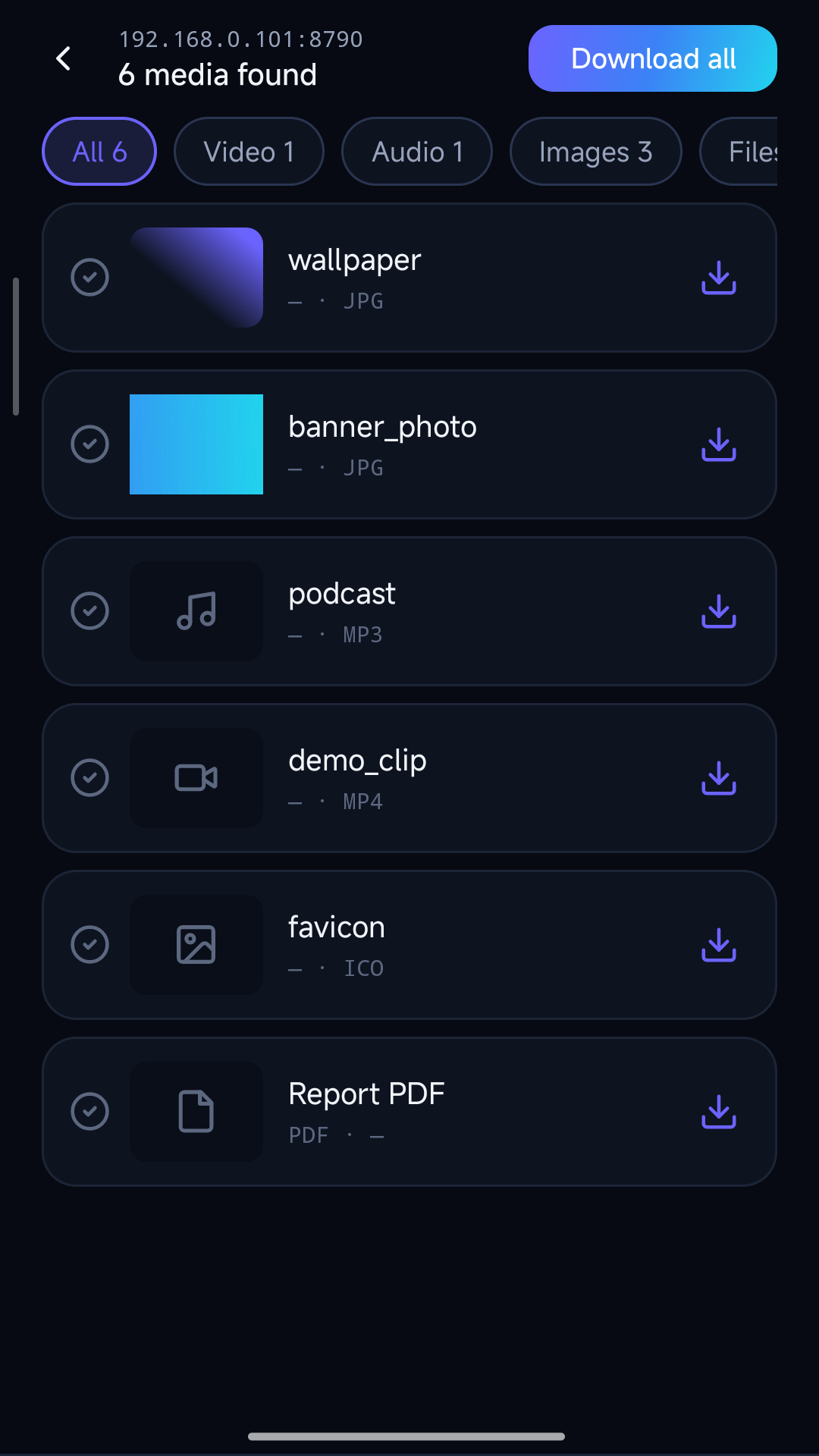
Because sniffing and downloading happen in the same app, the awkward parts are already handled: the page's Referer and cookies attach to every request (so hotlink-protected assets download cleanly), and HLS streams get assembled into a single MP4 rather than 600 loose fragments — here's the full m3u8 walkthrough if that part interests you.
It's free on Google Play. Nothing leaves your device — the scanning is on-device by architecture, not by policy promise.
What Sniffing Will Never Show You
One honest limit: DRM-protected streams don't yield to any of this. DevTools shows you a Widevine-encrypted manifest the same way it shows any other — you can see it exists, but the segments are useless ciphertext without the license exchange, which stays inside the hardware boundary. SAMPLE-AES HLS is the same story. Any tool claiming to "download from any streaming service" is either lying or illegal; media sniffing is a magnifying glass, not a crowbar.
Who This Is Actually For
Sniffing gets a bad reputation from its piracy edge case. The everyday uses are boring and legitimate:
- Recovering your own uploads from a platform with no export button
- Grabbing openly licensed assets (a course page, a government data portal)
- Journalists and auditors preserving exactly what a page served them at a point in time
- Archiving a vendor's product videos before the page gets redesigned away
The one rule that keeps all of these clean: only save what you're entitled to keep, and respect the site's wishes when it's explicit about them.
Downloaded a pile of media on your phone and need it on your laptop? BrowserDrop serves any folder over your own Wi-Fi to a browser — the hand-off step I originally built before the scanner existed.
Related Posts
Want to chat about indie dev or collaborate? Let's talk →
Get in Touch